Category Archives: Technology

What happens when a connected teacher loses the connection?

A normal hurdle in our connected lives is home Internet service.  For the last three days our Internet has been down.  And life has been different.

First, we have been spending more time together in the living room.  The older kids still had their mobile devices, but mostly to listen to music or to read.  My oldest daughter has been spending time working on her first graphic novel, the boys have been taking turns holding their new sister, and the two other girls have been running sprints to the front door.

Mom and dad have been intertwined into the activities.  I am the official starter for the sprints. The girls line up next to me and I say, “Go, Go, Go!”  Mom will make sure the boys hold their sister’s head right.  And we all check the newest panel in our daughter’s project.

The disconnect has allowed us a chance to reconnect during this busy time.

But being disconnected has its drawbacks.

First semester is the time I teach the Eng. 101 class.  The students use Moodle to turn in everything.  In the best circumstances, I am always just a little behind in grading.  The students write almost everyday.  I am now days behind in just that class.  I have work to do to just get caught up.

My other classes use Schoology, and I have kept up through the app on my phone.

Photo by former student Angelica.

Photo by former student Angelica.

But when the rest of our world stays connected, we have a digital mountain to climb when we reconnect with them.  We have emails to read and respond to, tweets and status updates to respond to, and for teachers, piles of digital papers to grade.

We might have come to the point that we cannot function well without being connected.  And that idea is for another blog.

A technician is headed to our house this morning to fix the problem.  And I will be back to grading papers late into the night. And tweeting during my breaks, of course.

2 Comments

Filed under Education, Family, Life, Technology

Whatever happened to Georgia Wonder?

Back in 2009 I was following a band Georgia Wonder on Twitter. I was also teaching a unit on digital literacy for my sophomores. I had a crazy idea to try to connect with people I followed on Twitter to enhance some of the topics we were covering in class. One of those people was Julian Moore of the band Georgia Wonder. He agreed to talk to my sophomores via iChat to talk about the music business.

Here is the online magazine my students produced from that lesson: Chalk: Georgia Wonder issue.

Here is the blog post Julian wrote: Nebraska USA.

But this post is not about that lesson; it is about relationships. Relationships in our digital age.

Julian and I hit it off right away. In fact we both have the same birthday. For quite some time after the iChat lesson we kept in contact on a regular bases. Georgia Wonder was working on a new album, and in fact the class and I got to hear the first single from the album as Julian was working on it. Today it is 2013 and I have lost contact with Julian. There have only been two posts on Twitter from the band since last year. Their blog has not been updated in a long time. Julian is working on a novel, but that blog has not been updated either. So what happen to a friendship in the making? Life.

Let me take a minute to bring in a few ideas that have been on my mind lately. In the TECHS class we have been discussing digital citizenship, and part of that discussion has been the change in our definitions of friendship, communication, and relationships. Yesterday we watched the following TED talk “Alone Together” by Sherry Turkle.

I have been reading the book You are not a Gadget by Jaron Lanier, which discuss many of the same ideas. This blog isn’t about those either.

Now this is a hard truth. I know that if I stopped using Twitter or Facebook, nobody would really care. Somebody might think off hand that I hadn’t posted anything in awhile, but life would go on. I will be starting a new job soon and in a few months after I leave ESU 10 somebody might think about me, but life goes on. But here is the point, the aspect we as a culture and as individuals are discovering and working through; life goes on whether we are online or not. (And I am thinking we need to be offline a little more… but that is for another post) But when we embrace the power to enhance our relationships through technology we create an incredible personal experience that enriches what we do and who we can become. At the moment much of technology discussion feels like technology is a separate aspect to our lives. It is not; it is a tool that can enrich our lives.

So what does this have to do with Georgia Wonder? Good question. I may never connect with Julian again, but the possibility is there because of technology. But just like any friendship, job, or change, life goes on. But my life, and my students’ lives, was enriched by our connection. If we keep the focus on how technology can make our lives better; I think we will do just fine.

By the way, Georgia Wonder, if you get the chance to read this… I’m still listening to your music.

Leave a comment

Filed under Education, Life, Technology

Class Research

The TECHS students did a simple Google Presentation on future technology. Each student, across four class periods, were assigned to find something cool happening in the world of technology.

Technology allows any of us to collaborate with ease.

Leave a comment

Filed under Education, Student Work, Technology

Aurasma

Overview:

Aurasma Lite allows you to create and view augmented reality tags, or Auras as they are called, in the world around you. The app allows you to create your own tag with premade Auras provided in the app (Aurasma animation, images or 3D models), or leave your own photo or movie file from your photo stream.

There are two options for making an Aura with the app, regular and local (published in a channel). A regular Aura is usually connected to an image that you place the Aura on.  You can then share that Aura through social media or email.  When someone clicks on the Aura link they can see your tag if they have the same image. A quick example would be leaving an Aura on a newspaper photo.

A local Aura is placed in a physical location.  This is great for creating tags for schools, or museums.  The difference is that the user makes a channel to share the Auras left at that location.

Aurasma also has a studio to create layered Auras.  The picture in the “Why I like it” section will give you an example of how the studio works.

Why I like it:

Steps to View:

1.Download the Aurasma Lite app.

2. Create an account.

3. Search for  “Jamey Boelhower ” with the search option and subscribe to my channel.

4. Point mobile device at the picture below to activate the Auras. Double tap the video to go full screen, tap the A to go to Aurasma’s site, and tap the Twitter icon to see my profile. Video was made with ScreenChomp.

Try to have iPhone in the full screen, might have to move your device to start the Auras.

Use in the classroom:

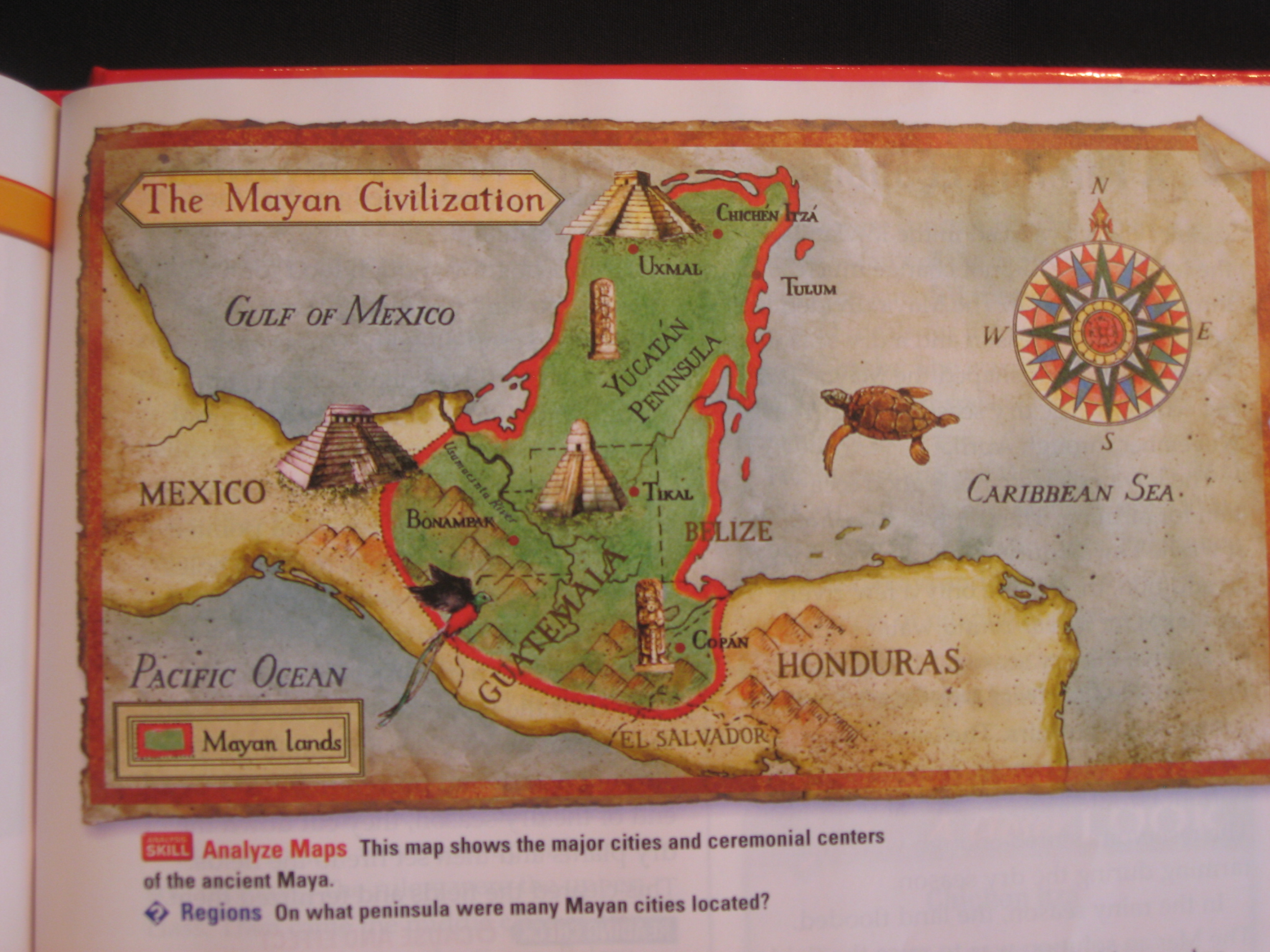
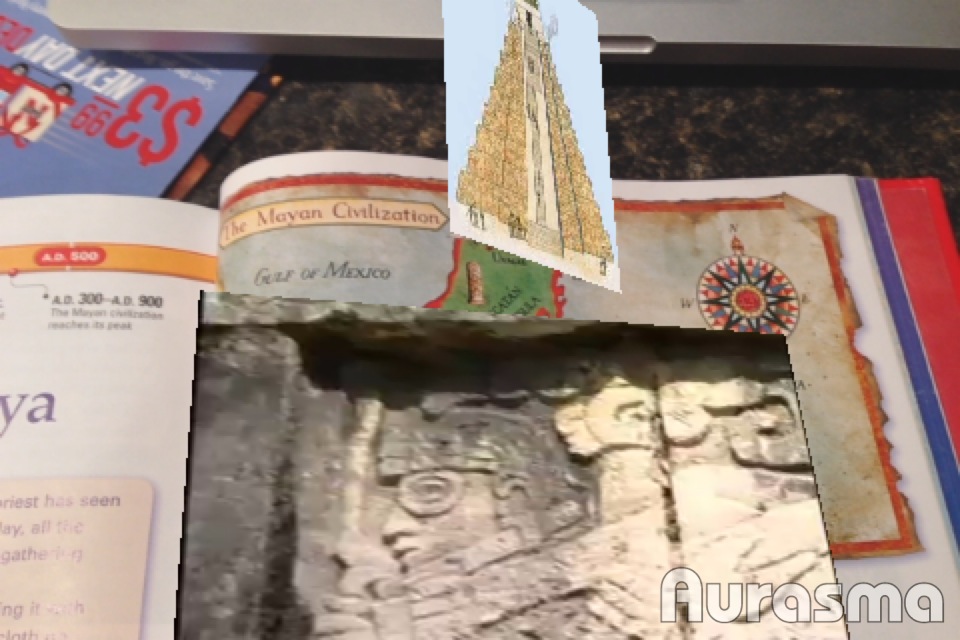
I think the power of Aurasma for educators is in the studio creation of Auras.  Below is an example of content I have tagged in a social studies book.

Map of Mayan Civilization

Auras include video and picture of temple.

Like the location Auras, the studio allows you to have a channel that you can update at anytime.  You can leave instructional videos, websites, and other material tagged in traditional books.  Many students use the calculator on their phone to do math problems, imagine, though, that they can review a lesson because it is tagged to an image in their textbook.

Using the app to create Auras can be a great way to make posters or bulletin boards interactive in the classroom.  Students can make review videos for books and leave Auras on book covers.  There are some many ways to use Aurasma in the classroom.

Share your ideas with me via Twitter (jdog90).

Leave a comment

Filed under Education, Technology

Coursebook

Overview:

Coursebook is a personal video textbook.  Coursebook features videos from Ted, Khan Academy, Stanford eCorner, Yale, Railscasts and other educational sources.  You can also connect your Facebook and Linkedin accounts to see what your friends are studying with Coursebook.


Why I like it:

Coursebook is a simple idea, but designed so well that it is easy to get lost in learning.  The idea is to build your own learning path by selecting videos to watch.  Coursebook then keeps track of what you have watched, which ones you have tagged to watch later, and even which videos you have started to watch. The app then gives you recommendations based off your course work.  You can share your videos through Facebook and Linkedin; also you can share with the Coursebook community.

You can access your course work on their website, too.

 Use in the classroom:

This app is perfect for flipping your classroom or enhancing your curriculum.  At the moment Coursebook is just over two years old and you can’t just type in any keyword and get video results.  But I see great potential in what they are developing, and it can release the ownership of learning to the student.

For example lets use the study of cells in a high school class.  How can Coursebook be used in this situation?

First, I did a keyword search with “cells” and Coursebook provided 11 results.  The top three videos are “Using nature to grow batteries,” “Transplant cells, not organs,” and “Printing a human kidney.”  What an interesting way to enhance information about the importance of cells in our life!  What if there was a day or a project in the science class that allowed the students to connect the classroom lesson with a video of their choice?

OK, now let’s expand that science class to the whole year.  The student can build a coursebook with videos of their choice for the whole year.  If there were videos you wanted to use in your class, you make sure all students add it to their playlist.  This is the power of the flipped classroom idea.  It’s not about just watching a video, but about watching something that sparks the students’ imagination and you, the teacher, providing them the freedom and time to work with their ideas and questions.  With Coursebook the videos can be watched anytime and anywhere, the classroom is where you take that spark and ignite their learning.

Share your ideas with me via Twitter (jdog90).

Leave a comment

Filed under Education, Student Work, Technology

Snapguide

Overview:

Snapguide is designed for users to create visual based how-to guides.  That’s it.  Sounds simple. It is and that is what makes it great.  The guides are built around teaching how to do something through pictures and videos.  Adding text is a part of the process, but you are limited to 200 characters a page.  Once your guide is finished you publish it to Snapguide’s site, then you can share it through other social media sites. Guides can also be viewed on their website, but can only be created through the app.

Why I like it:

It is easy and fun to make a guide with your mobile device.  One night I decided to make a Snapguide about one of my family’s favorite dinners, Pizza Sandwiches (click to see the Snapguide). So, I grabbed my iPad to take the pictures as I cooked, then designed the guide later that night.

Another bonus to the app is the Snapguide community.  You can investigate other guides, or follow someone who makes guides covering subjects your are interested in.  Be prepared to interact through the comment option with people who like your guides.

Use in the classroom:

I have a Process essay unit for my writing class.  I showed the students Snapquide as an option to create a “visual how-to” assignment (the students had a number of options).  Three students used Snapguide.  Below are their guides.

How to French Twist Hair

How to Bake Chocolate Chip Cookies

How to Make Ramen Noodles in the Microwave

Each guide was viewed at least 500 times.  Each had at least 50 loves.  And each got at least one comment.  This is the power of creating work that connects beyond the classroom.

The other side of Snapguide is finding guides to enhance what you are doing in class.  There are guides that could be used in art class, industrial arts, or music. Just browsing through the categories will spark ideas for you.

Snapguide’s focus is to allow users to make and find great step-by-step guides.  It is a great example of how we can share our knowledge with people who also enjoy our interest.  Using Snapguide is a great way to enhance any lesson that is centered on how to do something. Share your guides with me via Twitter (jdog90).

Series Note: I decided to use Tagwhat in the upcoming website series that I will be doing in December.

Leave a comment

Filed under Education, Student Work, Technology

Pic Collage

Overview:

Pic Collage is a fun, easy, and powerful app to create collages. It allows you to access photos from your camera roll, the web, Facebook, or take a picture from the app.  The app comes with a standard set of stickers, with the option to buy more sets.  You can add text, colored borders, and even crop your photos by tracing around the section you want. You can even send your collage as a postcard for $1.99.

The finished collage can be shared on Facebook, Twitter, and Tumblr.  You can also save it to your photos or send it in an email.  Pic Collage now has an account option that allows you to share your collages on Pic Collage’s site.

Why I like it:

Designing the collage is easy.  Rotating, resizing, arranging, and even trimming the photos are gesture based.  In no time you can create a nice looking collage. The ability to access images from the web makes the app a creative tool for the classroom.

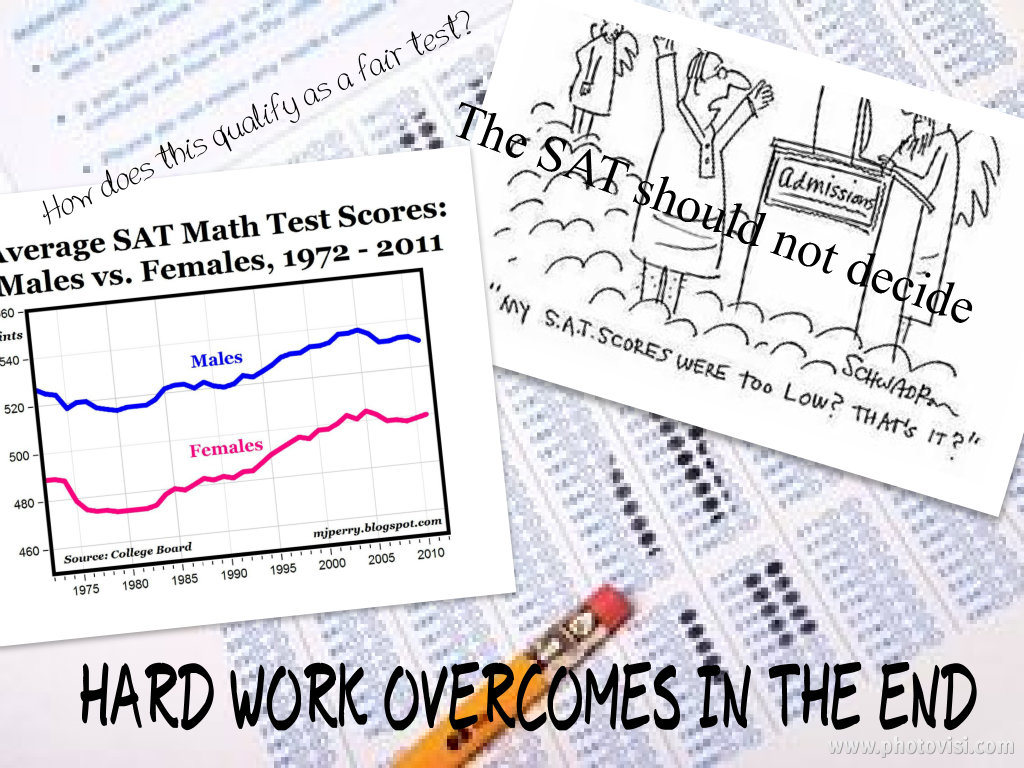
Created by Kaylee, English Comp student.

Use in the classroom:

I have used the app as a poster alternative.  The example above is a poster of a student’s persuasive topic.  I think Pic Collage can be used for any class or grade level.  Being able to access images from the web enables students to research and show their understanding of any topic in a new and inviting form.

Whether it is for the classroom, or a collection of photos from Thanksgiving, I think you will enjoy Pic Collage.  Share your collages with me via Twitter (jdog90).

Leave a comment

Filed under Education, Student Work, Technology

Announcing App Series

When I was in high school our school purchased a new technology that was going to change how the classroom worked.  We could now pause, rewind, and even jump to certain parts of a film.  I don’t remember which year it actually happened, but we moved from film projectors to VHS and Laser disc players.

In college I had a class that covered how to troubleshoot overhead projectors, VCRs and other technologies we might encounter in the classroom.  The objective was to be able to quickly handle situations so that instruction time was not disrupted.

These technologies didn’t really change anything.  Yes, we loved movie day in English class.  It was interesting to see how they changed the story and we would have discussions about how we “saw” the character versus the actor in the movie. But I would often doodle or write poetry during instructional films in Chemistry. Which might explain why I got D the first quarter, but did end up with a solid B by the end of the year. What changed was simply how we watched film.

Jump forward with me to today.  Using an idea from Malcolm Gladwell, I think we are at a “tipping point” in Education.  Mobile devices are the catalyst for this change.  I don’t think this is going to happen today, or even next year, but I sense the change.  And I think it will take one bold school in this area to start the change reaction.  What education might look like after the tipping point is for another blog.

This blog is to announce that next week I am going to do a five post series on specific apps for mobile devices that personify the fun, creative, and educational aspects of mobile devices. If you want to get started on investigating the apps for yourself, below are the days and apps with links to their sites.

Monday: Pic Collage (and photography in general)

Tuesday: SCVNGR (gamification)

Wednesday: Snapguide and Tagwhat (sharing what you know)

Thursday: Coursebook (creating your own course of learning)

Friday: Aurasma (augmented reality)

Join me next week to learn more. You never know what new ideas might be generated.


Leave a comment

Filed under Education, Technology

Happy Birthday?

What does it mean if I only had two people wish me happy birthday on social media?

In the overall scheme of things, it doesn’t mean much.  I could have written a post to notify everyone that it was my birthday and received the traditional responses.  But I didn’t.  And therefore there was no stream of birthday wishes on Facebook or Twitter.

So, why am I writing about it if it didn’t matter?… Because it is a chance to explore social media’s connection with human relationships.

Birthday Cookie

My family sang “Happy Birthday” to me as we shared birthday cookies from Eileen’s.  I got cards from my parents and friends, and laughed with my best friend about getting “old” and the irony of our age getting closer to our golf scores for 9 holes on the phone. I also got to host a workshop I designed for creative apps in the classroom.

The two birthday wishes I got via social media made me feel good, especially as the day wore on and nobody else wrote anything to me.  Of course, it got me thinking about what social media is and what we expect from it.

First, what did I expect from my social media connections?  Some of my connections are with people I consider friends; others are people I know I would be good friends with if we worked together or lived in the same area.  Even more connections are surface relationships made through social media because we are interested in the same things or working in the same field. Then there is connections, especially on Twitter, that are purely one sided.  I follow bands, athletes, and/or other powerful people that do not even know I exist, even if I do reply to one of their tweets.

What do these connections mean for me, for anyone?   It lets us be heard.

That is a powerful motivator (as expressed in the above movie clip from 12 Angry Men). We now can all be quoted. But that single aspect can lead us to believe that social media is more than it is. I see (or read) many people who use social media as the main facet of living.  The worst example is reading as a marriage disintegrated into divorce through Facebook updates.  Comments left on social media is not living.  Yet we can find ourselves sitting in front of a screen waiting for something to happen, most of the time just a response to our post… a reinforcement of our existence.

At this time in our society we are working through these social issues.  Finding that balance between our life in front of a screen and the life we have in front of our eyes.  The hard part is both affect our hearts.

The only answer I have at the moment is that I believe that social media, even just technology should be approached with the idea of enhancing our lives.  Allowing us to feel, share, or express our lives on deeper levels than we could not do without it.  From sending pictures of the grand-kids to the grandparents as we play in the park, to sharing lesson plan ideas with a teacher in Georgia.  Social media and technology allows us to experience and share life with close friends and family, but even more powerful is the ability to make connections that enrich our lives.  But we need to remember that life happens away from the screen and that there is a person behind the avatar.

Leave a comment

Filed under Family, Life, Technology

The American Scholar Today?

I have been thinking about Ralph Waldo Emerson’s speech “The American Scholar” lately.  The speech is a part of the American Literature course I teach in the spring semester, and it is one of my favorite pieces of literature.  I agree with so many of the points he expresses about true scholarship.

I wonder what he would think about the state of education today?   At the beginning of the speech Emerson reveals the three main influences in a scholar’s education. The first is Nature.  Simply stated, being outside.  Emerson goes much deeper in his speech, but the idea is that scholars spend time with Nature, spend time reflecting, as he states, “And, in fine, the ancient precept, ‘Know thyself,’ and the modern precept, ‘Study nature,’ become at last one maxim.”

I have been trying to conduct my DL classes as if I was in my own classroom, and so my CCC writing course went outside to write.  I instructed that they could take pictures, too.  As students will do, they had some fun:

Burwell Students

Then this morning 1011 News reported about Kearney public school’s “Outdoor Days.”  Don’t get me wrong; I think this is a really good idea.  But what does it say about the norm of our education, that having kids outside learning is news? Emerson states this is the first thing that influences scholars. Yet, we set up learning to be done inside, during the best time of the day and in rows.

The second influence is the “mind of the past” that at his time was best reflected in reading books.  We know that today that influence is even greater. I won’t spend time on this point because my thoughts have been on the fist influence, Nature, and the last influence…

Created at PicLit.com

Emerson makes a strong argument that true learning is done in living, “Of course, he who has put forth his total strength in fit actions, has the richest return of wisdom.”  He states that we can only truly understand that which we live, that true scholarship is produced through our lives.  Emerson states, “Character is higher than intellect. Thinking is the function. Living is the functionary. The stream retreats to its source. A great soul will be strong to live, as well as strong to think.”

I show this clip of Neil Gaiman at the beginning of the CCC writing course, listen to what his first piece of advice is for writers.

In my position I am immersed in technology, but I also see our students immersed in technology to the point that I do wonder if they understand the beauty and heartache of living.  Or are they just skimming the surface of life one statues update at a time?  I believe technology and especially mobile devices can enrich our lives deeply.  But that has to be the focus for the use of technology. It should be a tool we use in living. Living is our greatest teacher, “Time shall teach him, that the scholar loses no hour which the man lives” (Emerson).

I have been thinking about Emerson’s speech, “The American Scholar,” lately. I wonder what he would think about the state of our educational system?

Leave a comment

Filed under Education, Life, Student Work, Technology